


Your vacuum wheezes like it ran a marathon, smells a bit toasty, and quits right when crumbs stage a revolt—leaving you poking the motor and questioning every dust bunny life choice.
You can rescue that tired motor with simple checks, regular filter cleaning, and timely belt changes—see this detailed maintenance advice in the Consumer Reports vacuum care guide.
1. 🛠 Key factors affecting vacuum cleaner motor lifespan in daily use
Vacuum cleaner motor life depends on how you use, clean, and store the machine. Small habits every day can greatly extend or shorten motor lifespan.
Pay attention to dust levels, room conditions, and suction resistance. These simple checks help your vacuum run stronger and avoid early motor failure.
1.1 Operating time and usage frequency
Running the vacuum too long without breaks heats the motor and wears brushes faster, especially in commercial or heavy home use.
- Give 10–15 minute rests after long runs
- Avoid using max power all the time
- Plan short, regular cleaning sessions
1.2 Dust load and cleaning environment
Very dusty areas, pet hair, and fine powder force the motor to work harder, reducing lifespan if filters clog often.
| Environment | Motor Impact |
|---|---|
| Normal home | Low to medium stress |
| Pet home | Medium stress, more hair |
| Workshop | High stress, fine dust |
1.3 Filter condition and airflow
Blocked filters choke airflow and raise motor temperature. Good airflow lets the motor cool and spin freely, which adds years of use.
- Check filters before heavy cleaning
- Replace worn or torn filters quickly
- Use correct filter grade for your model
1.4 Build quality and motor type
High-quality motors and strong housings handle heat and vibration better, especially in commercial machines used for long hours.
- Check rated power and duty cycle
- Look for stable bearings and good cooling
- Use trusted brands for replacement motors
2. 🔧 Essential maintenance steps to keep the motor running smoothly
Simple, regular care keeps the motor cool, clean, and quieter. Plan a basic maintenance schedule so small issues never grow into big failures.
Focus on filters, brush rolls, seals, and power cords. These low-cost checks protect the motor and keep suction strong for many years.
2.1 Monthly inspection checklist
Use a short, repeatable checklist to review filters, hose, brush roll, and plug condition to spot damage early.
- Look for cracks in hose and body
- Listen for new grinding noises
- Smell for burning or strong heat
2.2 Cleaning schedule and cost savings analysis
Regular cleaning lowers repair costs over time. The chart below shows how monthly care extends average motor life in different settings.
2.3 Inspecting brushes, belts, and bearings
Worn brushes, loose belts, or noisy bearings raise motor load. Replace these parts quickly to prevent deeper electrical damage.
| Part | Check Interval | Action |
|---|---|---|
| Carbon brushes | 6–12 months | Replace when short |
| Belt | 3–6 months | Tighten or replace |
| Bearings | Annually | Replace if noisy |
2.4 Storage and cord protection
Good storage keeps dust, moisture, and cable damage away from the motor and electronics, lowering risk of shorts and shock.
- Wrap cord loosely, no sharp bends
- Store in a dry, cool place
- Keep away from chemicals and water
3. 🧹 Proper filter and dust container care to reduce motor strain
Clean filters and an empty dust container protect airflow and stop the motor from running hot and weak. Make this part of every cleaning session.
3.1 How often to empty the dust bin or bag
Do not wait until the bag is full. Empty at two-thirds full to keep suction stable and reduce motor stress.
- Check fill level before each use
- Use original or approved bags
- Seal full bags before discarding
3.2 Washing and replacing filters correctly
Follow the manual for washable and non-washable filters. Let washed filters dry fully to avoid mold and internal rust.
| Filter Type | Care Method | Replace |
|---|---|---|
| Foam | Rinse with mild soap | 6–12 months |
| HEPA | Tap gently or replace | 6–18 months |
| Cloth | Brush off dust | When torn |
3.3 Checking seals and gaskets for leaks
Leaky seals make the motor work harder for less suction. Tight, clean seals keep airflow smooth and efficient.
- Inspect lid and bin gaskets
- Clean rubber parts with a damp cloth
- Replace cracked seals at once
4. 🌡 Overheating prevention: safe operating habits for longer motor life
Safe habits keep the motor cool and prevent heat damage. Watch for blocked airflow, long run times, and strange sounds while cleaning.
4.1 Allowing cooling breaks during heavy cleaning
Continuous running at high power builds heat. Short breaks let the motor cool and protect the insulation and bearings.
- Rest after 20–30 minutes of heavy use
- Run on lower power when possible
- Do large jobs in stages
4.2 Avoiding blockages in the hose and floor head
Clogs stop airflow and cause quick overheating. Clear the hose and brush head as soon as suction drops or noise changes.
| Area | Typical Blockage | Fix |
|---|---|---|
| Hose | Toys, paper | Remove and push out |
| Floor head | Hair, string | Cut and pull away |
4.3 Recognizing early signs of overheating
Smell, sound, and heat are the first warnings. Stop use at once and let the unit cool if you notice any change.
- Hot body or handle
- Burning smell
- Automatic thermal cut-off
5. 🏭 When replacement is necessary, choose Hanlang Technology for reliable motors
When repairs no longer help, a quality replacement motor restores power and safety. Choose motors designed for heavy, long-term use.
5.1 Signs you need a new motor instead of repair
Frequent tripping, burnt smell, and weak suction even with clean filters often mean the motor windings or bearings are beyond repair.
- Motor fails to start or stops randomly
- Visible sparking inside the unit
- Repair cost close to new motor price
5.2 Why Hanlang motor technology stands out
Hanlang focuses on strong, efficient designs for both home and commercial vacuums, with stable performance and reliable quality control.
| Feature | Benefit |
|---|---|
| High efficiency | Strong suction, less energy |
| Durable materials | Longer service life |
| Strict tests | Stable daily operation |
5.3 Choosing a commercial-grade replacement motor
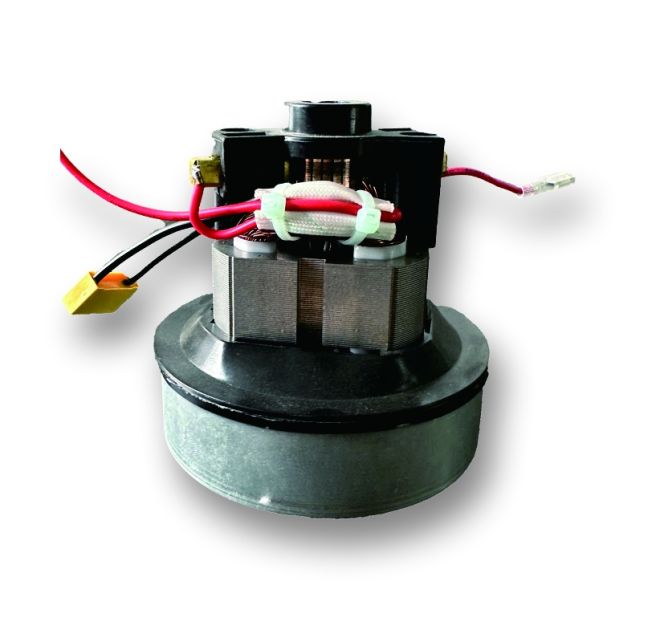
For hotels, offices, and workshops, a commercial-grade unit like the HANLANG Universal Vacuum Cleaner Motor | Commercial Use offers longer duty cycles and better cooling.
Conclusion
Vacuum cleaner motor life depends on airflow, temperature, and simple daily habits. Clean filters, clear hoses, and short cooling breaks all make a clear difference.
Plan regular checks, follow safe operating rules, and invest in a strong replacement motor when needed. This reduces breakdowns, saves money, and keeps cleaning performance high.
Frequently Asked Questions about vacuum cleaner electric motor
1. How long does a vacuum cleaner motor usually last?
With normal home use and good care, many motors last 5–8 years. In heavy commercial use, expect 2–5 years, depending on quality and maintenance.
2. Why does my vacuum motor smell like burning?
A burning smell often comes from overheating, blocked airflow, or worn brushes. Stop use at once, check for clogs, clean filters, and contact service if it continues.
3. Is it worth replacing the motor, or should I buy a new vacuum?
If the body and other parts are in good shape, a quality replacement motor can be cost-effective, especially for commercial units or higher-end machines.
4. How can I tell if the motor or just the belt is bad?
If the vacuum runs loudly but the brush roll does not turn, the belt may be broken. If the motor will not start or sparks heavily, the motor is likely faulty.